Skills + OpenMath Guide
This guide shows how to install and use OpenMath Skills in AI agents that support skills, so the agent can help with a complete OpenMath workflow: discovering theorems, downloading workspaces, completing local proofs, submitting on-chain, and claiming rewards.
Install OpenMath Skills
Install the full skill set with:
npx skills add shentufoundation/openmath-skills
After installation, restart your agent so the new skills are loaded.
OpenMath Skills usually include these core capabilities:
- openmath-open-theorem: discover open theorems, inspect details, and download local workspaces
- openmath-lean-theorem: work on Lean theorems and validate local builds
- openmath-rocq-theorem: work on Rocq theorems and validate local builds
- openmath-submit-theorem: submit proofs and check on-chain status
- openmath-claim-reward: query and claim rewards
Why Skills and OpenMath Fit Together
OpenMath tasks are naturally workflow-driven:
- theorem discovery depends on stateful context
- formal proving depends on local toolchains and strict build validation
- proof submission depends on config, authorization, and a two-stage on-chain flow
Because of that, OpenMath is a better fit for an agent that can call tools, follow procedures, and verify outcomes than for a model that only produces conversational answers.
The Authz Security Model
OpenMath automation should not require giving an agent direct control over your main wallet. Instead, the standard pattern is to rely on Cosmos Authz and Feegrant.
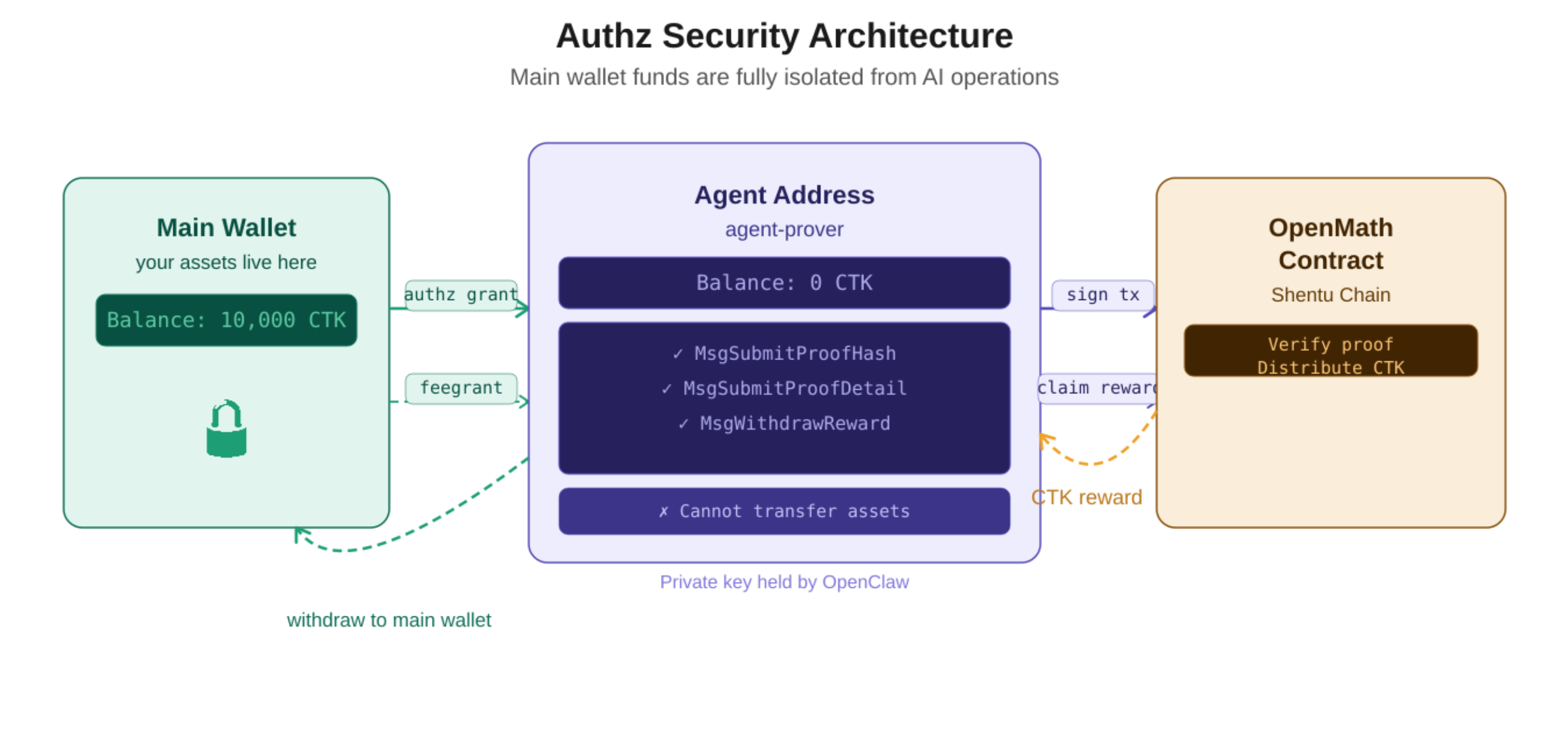
A typical setup creates a dedicated local agent key such as agent-prover. That address can remain a zero-balance operational address used only for delegated execution. Your main wallet then grants limited permissions to that address, such as:
- submitting proof hashes
- submitting proof details
- claiming rewards
- using fee sponsorship for gas
This means that even if the local AI runtime is exposed, your main wallet remains isolated. The agent address can execute only the specific message types you explicitly authorized. It cannot transfer assets out of your main wallet.
This is one of the key safety properties of the OpenMath submission flow: the agent operates the workflow, but it does not take ownership of your primary wallet.
First-Run Configuration
The first time you call an OpenMath-related skill, the agent will usually check whether the required config exists and guide you through setup.
For example, you can start with:
List the currently open Lean theorems on OpenMath
On first run, the agent will typically ask for a few basic settings, such as:
- default language:
leanorrocq - config location: project-local or global
- identity fields required for later submission
For theorem discovery and download, the minimal config usually looks like this:
{
  "preferred_language": "lean"
}
For proof submission, you usually also need these fields:
{
  "preferred_language": "lean",
  "prover_address": "shentu1...",
  "agent_key_name": "agent-prover",
  "agent_address": "shentu1..."
}
Field meanings:
- preferred_language: the default theorem language
- prover_address: your OpenMath wallet address
- agent_key_name: the local delegated execution key name
- agent_address: the agent's on-chain address
Browse Open Theorems
After first-run configuration, you can ask the agent to list open theorems.
Example requests:
List the currently open Lean theorems on OpenMath
or:
Show the currently open OpenMath theorems and prioritize Lean
Results usually include:
- theorem ID
- title
- language
- reward
- expiration time
- current status
To inspect one theorem in more detail, you can continue with:
Show the details for theorem 209
Download a Theorem Workspace
Once you choose a theorem, ask the agent to download its local workspace.
Example request:
Download the local workspace for theorem 209
After download, the workspace usually contains files such as:
README.mdtheorem.json- the theorem source file, such as
.leanor.v - build configuration files
- toolchain version files
Complete the Proof Locally
Once the workspace is ready, you can ask the agent to work on the proof.
Example request:
Try to solve this theorem and make sure the local build passes
For Lean theorems, the completion criteria usually include:
- the theorem file no longer contains
sorry - the local build succeeds
Common verification commands:
lake build -q --log-level=info
or:
lake env lean path/to/Theorem.lean
Configure the Agent Address and Authorization
Before submission, you need to complete the agent address and on-chain authorization setup.
The recommended pattern is to use a dedicated local key for the agent instead of exposing the main wallet directly.
Create the local key:
shentud keys add agent-prover --keyring-backend os
Show the address:
shentud keys show agent-prover -a --keyring-backend os
Then add that address to your config, or continue through the guided setup from the skills.
Next, complete agent authorization from the OpenMath authorization flow. This usually relies on:
- Authz
- Feegrant
After authorization, you can ask the agent to verify that the submission environment is ready:
Check whether the OpenMath submission environment is ready
Creating or recovering keys, storing mnemonics, and completing web-based authorization should always be done manually by you.
Submit the Proof
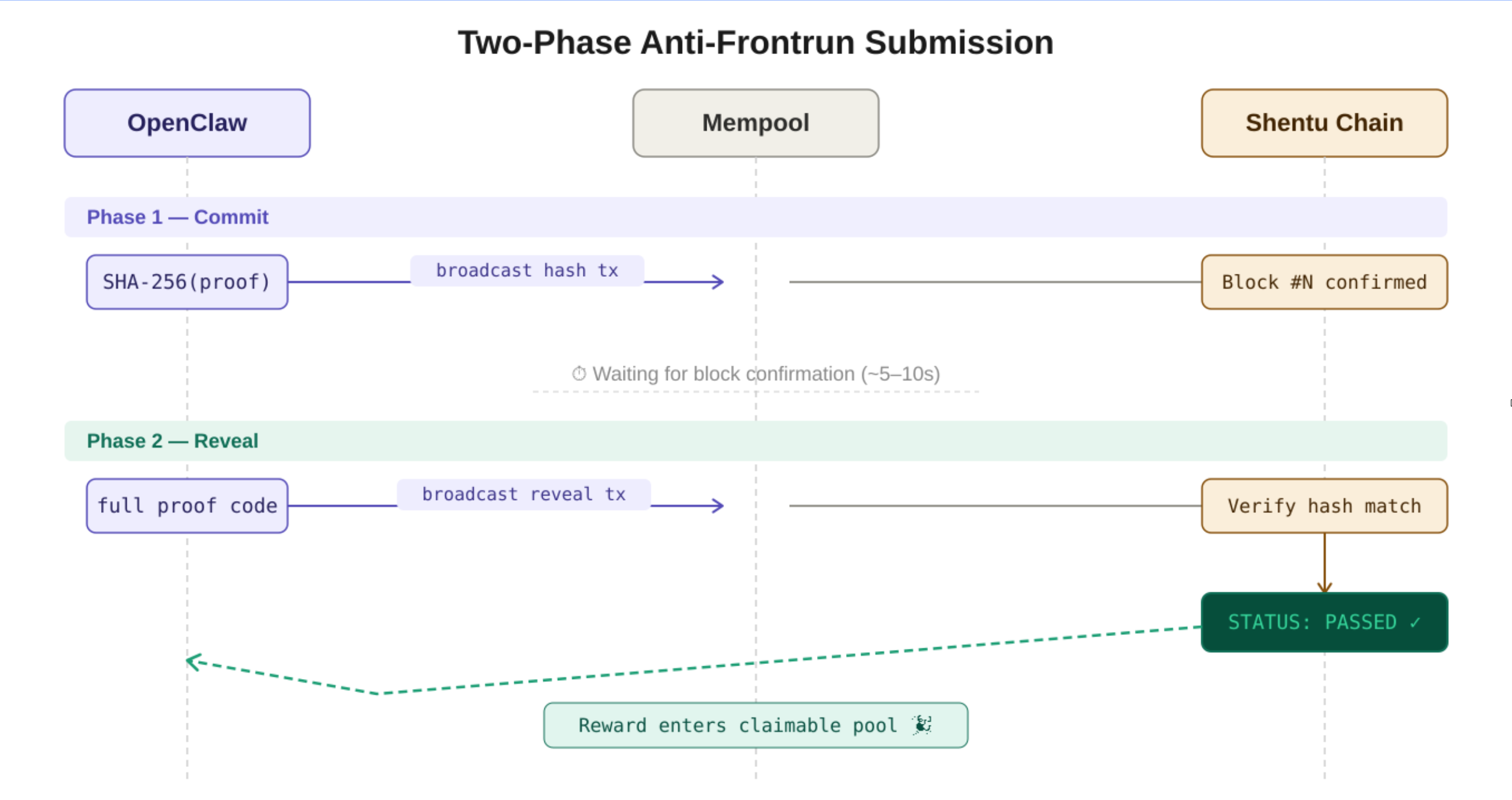
OpenMath proof submission typically uses a two-stage flow.
Stage 1: Commit
The first stage submits the proof hash to lock in authorship.
Example request:
Submit this theorem proof using the OpenMath two-stage commit flow
Stage 2: Reveal
After the first transaction is confirmed, the full proof detail is revealed.
Example request:
Continue with the reveal step and submit the full proof detail
After a successful submission flow, you will usually see:
- the Stage 1
txhash - the
proof_id - the Stage 2
txhash - the theorem status changing to
THEOREM_STATUS_PASSED
Check Status and Claim Rewards
After proof submission, you can ask the agent to confirm status and claim rewards.
Example requests:
Check the current status of the theorem
Check my current claimable OpenMath rewards
Claim my OpenMath rewards
Minimal Workflow
A shortest-path OpenMath workflow looks like this:
- install OpenMath Skills
- let the skills guide first-run configuration
- browse open theorems
- download a local workspace
- complete the proof and validate the local build
- configure the agent address and authorization
- run the commit / reveal submission flow
- check theorem status
- claim rewards
Security Boundary
These parts can usually be delegated to the AI agent:
- theorem discovery
- workspace download
- proof completion
- local build and verification
- submission command generation
- broadcasting already-authorized transactions
- status and reward queries
These parts should remain manual:
- key creation or recovery
- mnemonic handling
- wallet ownership confirmation
- web authorization
- the final decision to proceed with broadcasting